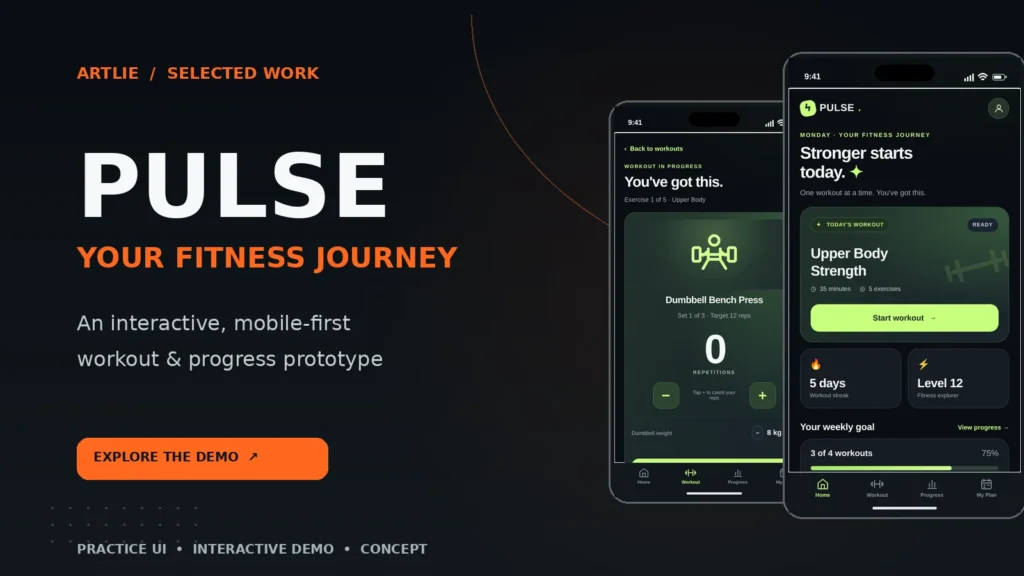
PULSE is an interactive iPhone-inspired fitness application concept, designed to make workouts easier to follow and personal progress simpler to understand. The prototype is built in HTML, CSS and JavaScript and can be explored directly below.
Experience the prototype
Explore the real interface in the embedded phone. Start an example workout, adjust a repetition counter, browse progress, or customize a weekly goal. Each action happens inside the actual HTML prototype.
Don't just scroll.
Try the app.
Explore the actual mobile-first PULSE prototype. Start a guided workout, count repetitions, browse progress, and set weekly fitness goals. Everything inside the phone responds to your taps.
- Work out: tap the start button, track reps and complete sets.
- Explore: see progress, measurements and the photo diary.
- Personalize: set goals, choose training days and try onboarding.
Click Enlarge & try app for a distraction-free, full-screen experience. Use the + / − controls to zoom. The demonstration contains sample data.
Interactive prototype · Touch and scroll inside the iPhone
Take a closer look.
Tap a screenshot to enlarge and zoom into the interface.
About this prototype: PULSE is a browser-based interactive concept, not a released iOS app. Workout data is illustrative; repetition counting is manual, and camera-based exercise detection, real reminders, user accounts and cloud sync aren't implemented. Selected progress photos are previewed locally.
The idea behind PULSE
Gym training can feel overwhelming when workout instructions, routines, goals, and progress are scattered across different tools. PULSE explores a calmer, more approachable experience with straightforward navigation and a focused daily training flow.
What visitors can explore
- Today’s workout: a guided upper-body workout card with estimated session time and exercise count.
- Workout interaction: manual repetition and set counting, editable dumbbell weight, exercise guide and completion state.
- Personal goals: adjustable weekly workout goals, training days, and basic reminders preferences.
- Progress views: sample workout history, illustrative XP, streak and goal visualization.
- Progress photo preview: choose a photo locally in the browser without uploading it to a server.
- Onboarding concept: first-time experience steps covering goals, experience and training frequency.
Design & development approach
Designed as a responsive, mobile-first HTML prototype with an iPhone-style status bar, thumb-friendly bottom navigation, dark surfaces, high-contrast lime accents, simple guided flows and lightweight JavaScript interactions.
Current development status
This is a functional visual prototype, not a production mobile app. Repetition tracking is manual; camera-based movement analysis is not implemented. Reminders are demonstration preferences, statistics are sample values, and there is no account service or cloud data synchronization.
Technology
HTML5 · CSS3 · Vanilla JavaScript · Responsive UI · Mobile-first prototyping
Interested in a similar custom web or mobile experience? Discuss your project with Artlie Digital →